Pairing Intent
The pairing intent is only supported in version 3.2.4 or later of the Aladdin app.
Overview
Applications can use a pairing intent that is exposed by the Aladdin app to start a pairing activity in the Aladdin app. This activity displays a barcode that can be scanned by a CODiScan to pair it with the device.
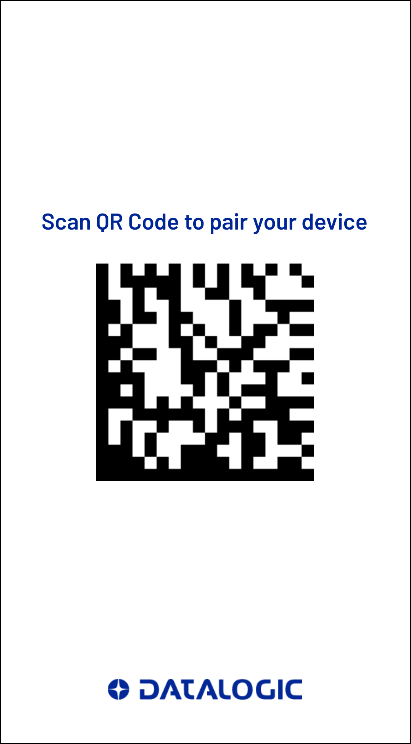
Action
When creating the pairing intent the following action should be used:
com.datalogic.aladdinapp.ACTION_EXTERNAL_PAIRING_ACTIVITY
Extras
The pairing intent supports several extras that can be used to configure the operation and appearance of the pairing activity. All extras are optional.
Auto Close
Controls how the pairing activity should behave once a pairing is completed or an error occurs.
- Key Name:
autoClose - Type: int
- Default:
2 - Values:
- 0 - Pairing activity will remain running on successful pairing or error.
- 1 - Pairing activity will automatically close and return to the application that issued the intent.
- 2 - Pairing activity will remain running until "Close" button is tapped by the user.
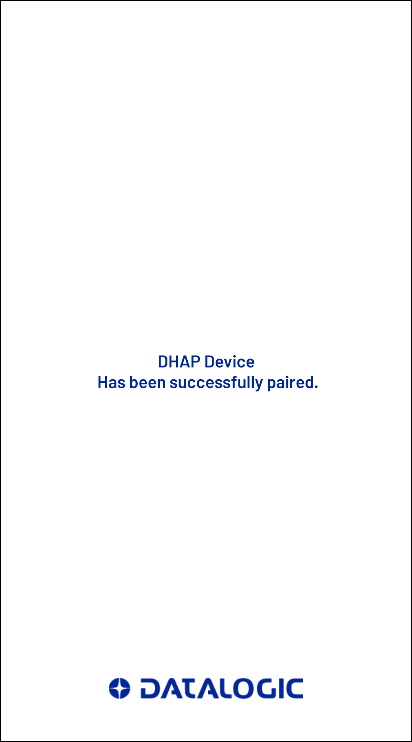
Auto Close = 0
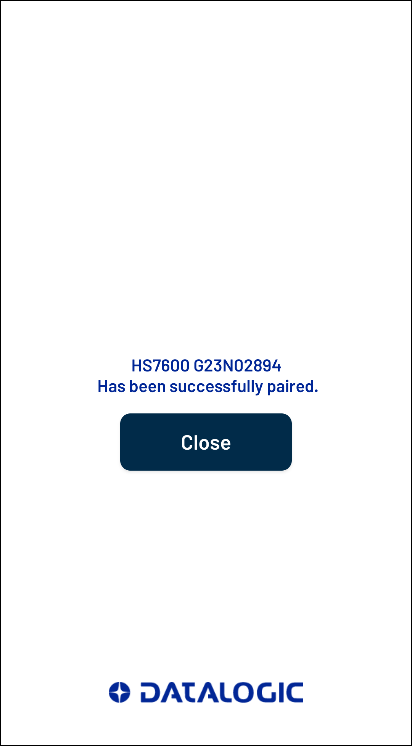
Auto Close = 2
Show Logo
Controls whether the Datalogic logo should be displayed.
- Key Name:
showLogo - Type: boolean
- Default:
true - Values:
- false - Hide the Datalogic logo
- true - Show the Datalogic logo
Background Color
Sets the background color.
- Key Name:
bgColor - Type: string
- Default:
#FFFFFF - Format:
- Data is specified in hexidecimal RGB data with the format
#RRGGBB.
- Data is specified in hexidecimal RGB data with the format
Title Color
Sets the title text color.
- Key Name:
titleColor - Type: string
- Default:
#002696 - Format:
- Data is specified in hexidecimal RGB data with the format
#RRGGBB.
- Data is specified in hexidecimal RGB data with the format
Title
String that should be displayed above the pairing barcode.
- Key Name:
title - Type: string
- Default:
Scan QR Code to pair your device
Sample code
The following code fragment illustrates how to issue the pairing intent.
- Kotlin
- Java
// Register callback for activity result
val startForResult = registerForActivityResult(StartActivityForResult()) { result ->
    when (result.resultCode) {
        Activity.RESULT_OK -> {
            // Pairing completed successfully
        }
        Activity.RESULT_CANCELED -> {
            // Activity closed before pairing completed
        }
        Activity.RESULT_FIRST_USER -> {
            // Pairing failed
        }
    }
}

// Create activity intent
val pairingIntent = Intent("com.datalogic.aladdinapp.ACTION_EXTERNAL_PAIRING_ACTIVITY")
    .putExtra("autoClose", 1) // Close automatically on connect
    .putExtra("showLogo", false) // Hide the Datalogic logo
    .putExtra("bgColor", "#CCCCFF") // Set the background color to light blue
    .putExtra("titleColor", "#FF0000")  // Set the title color to red
    .putExtra("title", "Scan this to pair.") // Set the title to custom text

// Launch the activity
startForResult.launch(pairingIntent)
// Register callback for activity result
ActivityResultLauncher<Intent> startForResult = registerForActivityResult(
    new StartActivityForResult(),
    new ActivityResultCallback<ActivityResult>() {
        @Override
        public void onActivityResult(ActivityResult result) {
            switch (result.getResultCode()) {
                case Activity.RESULT_OK:
                    // Pairing completed successfully
                    break;
                case Activity.RESULT_CANCELED:
                    // Activity closed before pairing completed
                    break;
                case Activity.RESULT_FIRST_USER:
                    // Pairing failed
                    break;
            }
        }
    });

// Create activity intent
Intent pairingIntent = new Intent("com.datalogic.aladdinapp.ACTION_EXTERNAL_PAIRING_ACTIVITY")
    .putExtra("autoClose", 1) // Close automatically on connect
    .putExtra("showLogo", false) // Hide the Datalogic logo
    .putExtra("bgColor", "#CCCCFF") // Set the background color to light blue
    .putExtra("titleColor", "#FF0000") // Set the title color to red
    .putExtra("title", "Scan this to pair."); // Set the title to custom text

// Launch the activity
startForResult.launch(pairingIntent);