WorkDesk Settings
Overview
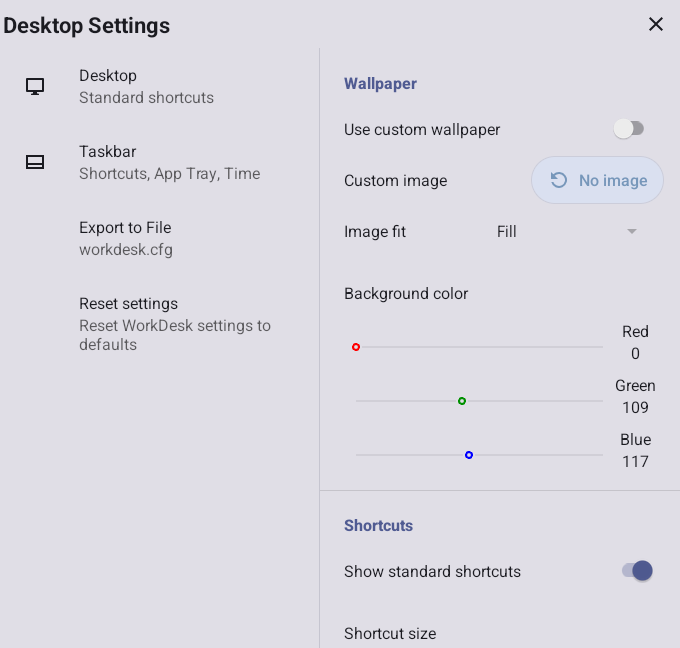
The WorkDesk Settings window provides controls for configuring most Datalogic WorkDesk features, as well as management of configuration settings. The window operates similar to the Android Settings application, and can be reached from the Apps menu.
EMM Configuration
The configuration settings available from the Settings window can also be managed by Scan2Deploy Studio or an EMM console. Once the values have been sent to the device, they will take precedence over values that may have been set within the app from the Settings window.
When using an EMM configuration, an additional option is available for importing settings from a separate configuration file created on another device. Details on how to do this can be found in Export/Import settings
Once an EMM configuration has been applied, the WorkDesk Settings window will display an additional switch labeled Override administrator settings. When this swtich is disabled, the WorkDesk configuration controls are disabled to prevent settings adjustments from the device. When enabled, the EMM settings are ignored and the controls are enabled to allow the settings to be changed. The override also controls access to changes in the desktop shortcuts.
Location of Files
When a configuration setting refers to an external file (such as a custom image), the location of the file may be specified in one of two ways. If the setting begins with a "/" (slash), it is assumed that the full path to the file is specified. If not, then the file is assumed to be stored in the public "Downloads" directory.
Export to File
This setting allows you to save the entire desktop configuration to a separate file. This file can then be placed on other devices and used to copy the configuration to them. Specific steps for exporting and importing a configuration file can be found in Export/Import settings
Reset Settings
Clicking on Reset settings in the settings window will reset all the settings to default values (after confirmation). Here is a list of all the settings and their default values.
| Setting | Default value |
|---|---|
| Import From File | EMM (or Scan2Deploy Studio) only; Blank (don't import settings from file) |
| Wallpaper Settings | |
| Use custom wallpaper | Disabled (display device wallpaper). |
| Wallpaper Image | None |
| Image fit | Fill |
| Background Color | FFFFFF (white; concatenated hexadecimal values for Red, Green, Blue) |
| Custom shortcuts | Empty (no shortcuts defined) |
| Package name | Name of the app package from its manifest |
| Web page URL | Empty (Don't use URL) |
| Shortcut name | Same as specified in the package manifest |
| Shortcut Icon | Same as specified in the package manifest; standard built-in icon for URLs |
| Shortcut Settings | |
| Show standard shortcuts | Enabled (Add Settings, Chrome and Files to the start of the list) |
| Shortcut Size | Small |
| Shortcut Label Color | FFFFFF (white; concatenated hexadecimal values for Red, Green, Blue) |
| WorkDesk Administration | |
| Administrator Password | Blank (open access to settings) |
| App Tray | |
| Show App Tray | Enabled |
| Allow moving apps between displays | Enabled |
| Screen Capture | |
| Show Screen Capture button | Enabled |
| Taskbar Settings | |
| Audio status | Show + Settings |
| Bluetooth status | Show + Settings |
| Ethernet status | Show + Settings |
| Cellular status | Show + Settings |
| Wi-Fi status | Show + Settings |
| Battery status | Show + Settings |
| Date/Time status | Show + Settings |
| Background Color | 111111 (dark gray; concatenated hexadecimal values for Red, Green, Blue) |
| Content Color | FFFFFF (white; concatenated hexadecimal values for Red, Green, Blue) |