Magellan SDK
Overview
The Magellan SDK is comprised of two APIs to access the MG9600i or MG9900i scanner, scale, and cameras.
For information on the setup and programming of the Magellan Scanner/Scales, click on the following links:
Event API
Allows an application to receive asynchronous events from the scanner in real time (e.g., label read, stable weight, scanner state, etc.). This is done through a WebSocket connection to the scanner over Ethernet.
Security is through a self-signed certificate, which is generic for all devices. Becasue of this, it will fail some levels of validation:
- Since it is self-signed, it doesn't exist in any certificate authority.
- The hostname is generic and will fail hostname verification.
Depending on the WebSocket client, it may need to be configured to ignore the issues with the certificate.
For further details, see the Event API page.
For technical documentation, see the Event YAML page.
Rest API
Allows an application to request information and data from the scanner using the RESTful API architecture over the Ethernet connection. Images or video can be captured from any camera, except the CFR (Customer Facing Reader). Information, health and statistics from the scanner, scale or cameras can also be requested.
The Rest API requires authorization before receiving and acting on any command. This is accomplished with the following steps:
- The developer of the Client sends a request to Datalogic for a signed certificate.
- Datalogic confirms the developer and returns the signed certificate along with the associated Private Key.
- The Client must send the certificate with each command.
- The Rest server confirms the certificate was signed by Datalogic before processing the command.
The specific protocol for this exchange of certificate and private key is dependent on the language and tools used by the developer of the client.
For further details, see the Rest API page.
For technical documentation, see the Rest YAML page.
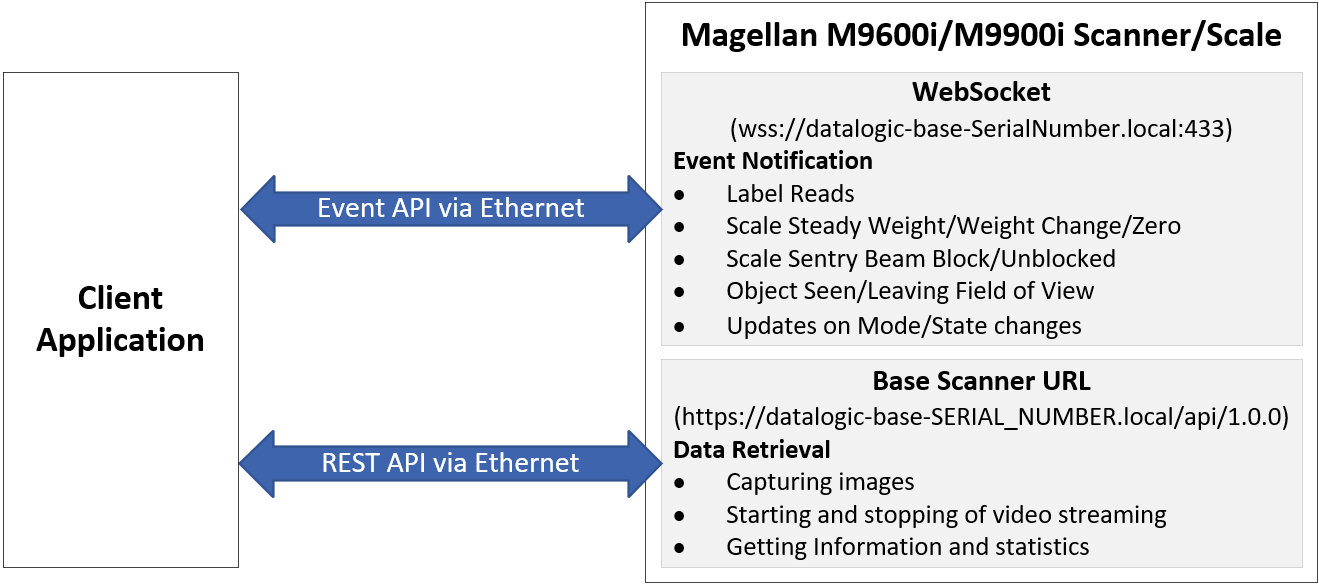
Getting Started
- Open a WebSocket to the scanner by connecting to URL:
wss://datalogic-base-SerialNumber.local:433,
where SerialNumber is the serial number of the scanner.
More information on the WebSocket is available on the Event API page. - Rest API Authorization is accomplished with the following steps:
- The developer of the Client sends a request to Datalogic for a signed certificate.
- Datalogic confirms the developer and returns the signed certificate along with the associated Private Key.
- The Client must send the certificate with each command.
- The Rest server confirms the certificate was signed by Datalogic before processing the command.